Building Personal Ledger With AI
contents
When I introduced Personal Ledger, I mentioned that I am using an AI coding agent, and I promised more on that later. This is that post.
Big picture is that I have a full-time job, and I wanted Personal Ledger to be an ambitious project. Without an AI assistant, I think it would be a project that I tinker with for years, never finish and never makes it into other people’s hands. With an AI assistant, it is progressing faster than I thought possible for one person working on it in the gaps around a job and family duties.
More than a code generator
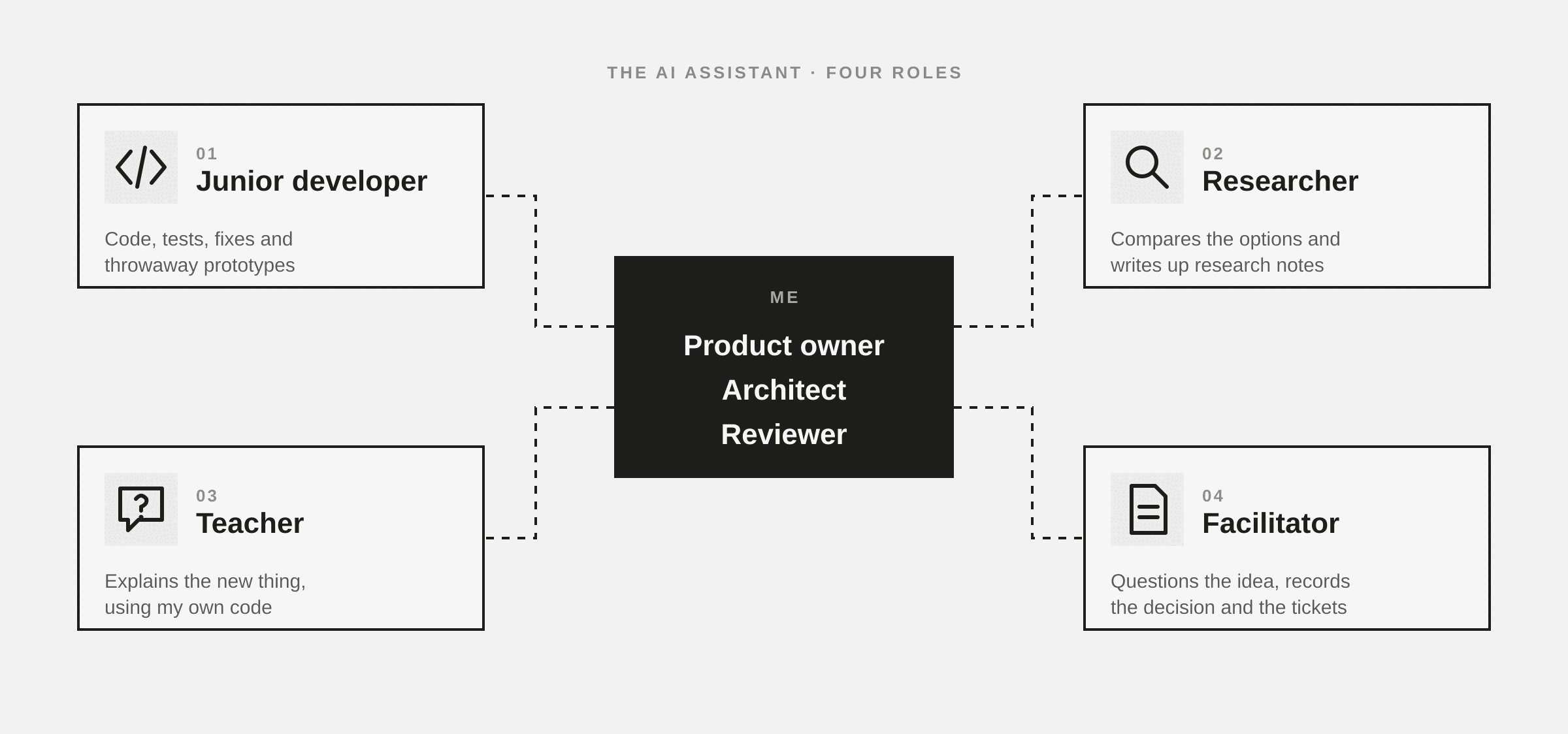
The common picture of AI coding assistance is autocomplete with ambition. You describe a function and it writes it. That’s part of it, but it undersells what it can do and how I actually use it. Day to day, the AI assistant plays four roles:
- The junior developer
- The researcher
- The teacher
- The facilitator
1. The junior developer
This is the obvious role. The junior does the grunt work of writing code. The new screen, the database adapter, the dialog with its six fields and its validation. It writes the tests, runs them, reads the failures and fixes them. It runs the linter and cleans up what it finds.
The junior developer is also great for prototypes. When I’m not sure whether an idea will work, like whether a Rust terminal app can draw the charts a finance app needs, I can ask for a throwaway prototype and have an answer in an hour instead of a week. The feedback loop is short, if the idea is wrong I’ve lost very little. If it’s right, I know what to build properly.
Like any junior, it needs direction and its work needs review. It will happily take a shortcut that passes the tests but breaks the design. That’s part of why I chose an architecture with firm boundaries, which I’ll cover in the next post. The build catches the shortcut before I have to.
2. The researcher
Before a decision, there’s usually a question I can’t answer yet. Which desktop GUI framework should a Rust app use? How should the sync server authenticate devices? How do other apps handle dates typed in different languages?
The assistant reads the documentation, compares the options and writes up what it found, with sources, as a note in the repo. Personal Ledger has over thirty of these research notes as of this post, covering GUI frameworks, charting libraries, packaging tools, sync approaches and localisation. They’re the groundwork under most of the bigger decisions, and because they’re saved, I don’t have to research the same question twice.
3. The teacher
I’m not a professional software developer. There’s a lot I don’t know, and Personal Ledger keeps finding the edges of it. Which is part of the fun of developing it. When I hit something new, whether a Rust ownership puzzle, a GUI architecture pattern or how SQLite handles a write from two places, I can ask the assistant to explain it at my level, with examples from my own code.
That’s different from searching the web. The explanation is about my problem, in my code, and I can keep asking “why?” until I actually understand it. A good chunk of what I know about Rust and app architecture now came from those conversations.
4. The facilitator
This one surprised me. Some of the most useful sessions don’t write any code at all. I can bring a half-formed idea, and the AI assistant will question it. What happens when the account is closed? What if two devices edit the same transaction offline? Is this one concept or two?
Being grilled like that, by something with no stake in the answer, forces the idea into shape. The result gets written down. A term in the project glossary, an Architecture Decision Record (ADR) explaining what was chosen and why, and tickets for the work. Personal Ledger has over fifty decision records as of this post. In a team, a good facilitator does this in a meeting. Working alone, the assistant does it for me.
What that leaves for me
If the AI assistant is the team, I’m the product owner, the architect and the reviewer. I decide what Personal Ledger should be and what gets built next. I set the design, the architecture and the framework. I make the calls on how it fits together. And I read what comes back and decide whether it’s good enough to keep.
That last part matters. The AI assistant is confident whether it’s right or wrong, so the review is the job, not a formality. The tests, the linter and the architecture’s rules catch a lot. My review is there for the rest: is this what I actually wanted, and does it fit?
Building around a full-time job
The biggest change is in how I can fit the work into my life. Personal Ledger gets built in evenings and weekends, often in short blocks. Before, a short block was nearly useless for a project this size. By the time I’d reloaded the code into my head and rebuilt the context in my brain, the time was gone.
Now the context lives in the repo, not in my head. The glossary, the decision records, the research notes and the tickets are what the assistant reads to get going, and they’re what I read to remember where I was. I can pick up a ticket, set the assistant working, review what it did, and stop, without losing the thread. Some of the longer work can even run while I’m doing something else.
Writing all that down used to feel like paperwork. Now it’s the thing that makes the project work, and Personal Ledger is better documented than anything I’ve built before because of it.
Wrapping up
AI hasn’t replaced the thinking in building software. It has taken away much of the typing, the searching and the lonely parts, and that’s what makes a project like Personal Ledger possible for one person with a day job.
If you’re sitting on a side project that always felt too big for the time you have, it may be worth another look. And if you want to see what AI-assisted code looks like up close, Personal Ledger is on GitHub.