Introducing Personal Ledger
contents
I have tried many personal finance tools and systems over the years. Some were outdated, some had confusing interfaces, and some were built around a way of tracking money that didn’t match how I think about it. Almost all of them wanted my financial data to live on someone else’s server.
So I am building my own. It is called Personal Ledger, and this post covers why it exists, what I want it to become, and how I plan to get there.
Why build another finance app?
Most personal finance software forces you into a particular model or framework. If it doesn’t fit how you track finances, it’s frustrating to use. That’s why so many people give up and move to something flexible, like a spreadsheet. Since I couldn’t find one that worked for me, I decided to build my own finance app based on how I see the world.
Personal finance software also has an awkward business model. Most people who want to track their money are not willing to pay $100 a year for the privilege. Businesses are, which is why so many personal finance tools pivot toward small-business accounting tools. The ones that stay personal often don’t get the love, which usually means slow development, missing features, or your data becoming the product.
I wanted something different:
- It tracks money the way I want to. Simple single-entry transactions against accounts, payees and categories, rather than forcing double-entry bookkeeping on a household budget.
- I own the data. It lives on my machines, in a file I control, not in a vendor’s cloud.
- It works offline. No internet connection, no subscription and no third party needed to see where my money went.
That is the gap Personal Ledger aims to fill: a local-first ledger where the owner fully controls their own financial data.
What I hope it to be
The vision is an intuitive interface that gives clear insight into your spending habits and your investment and asset position, so you can track your overall financial health, make informed decisions and reach your financial goals, without handing your financial data to anyone else.
In practice, the project aims to have:
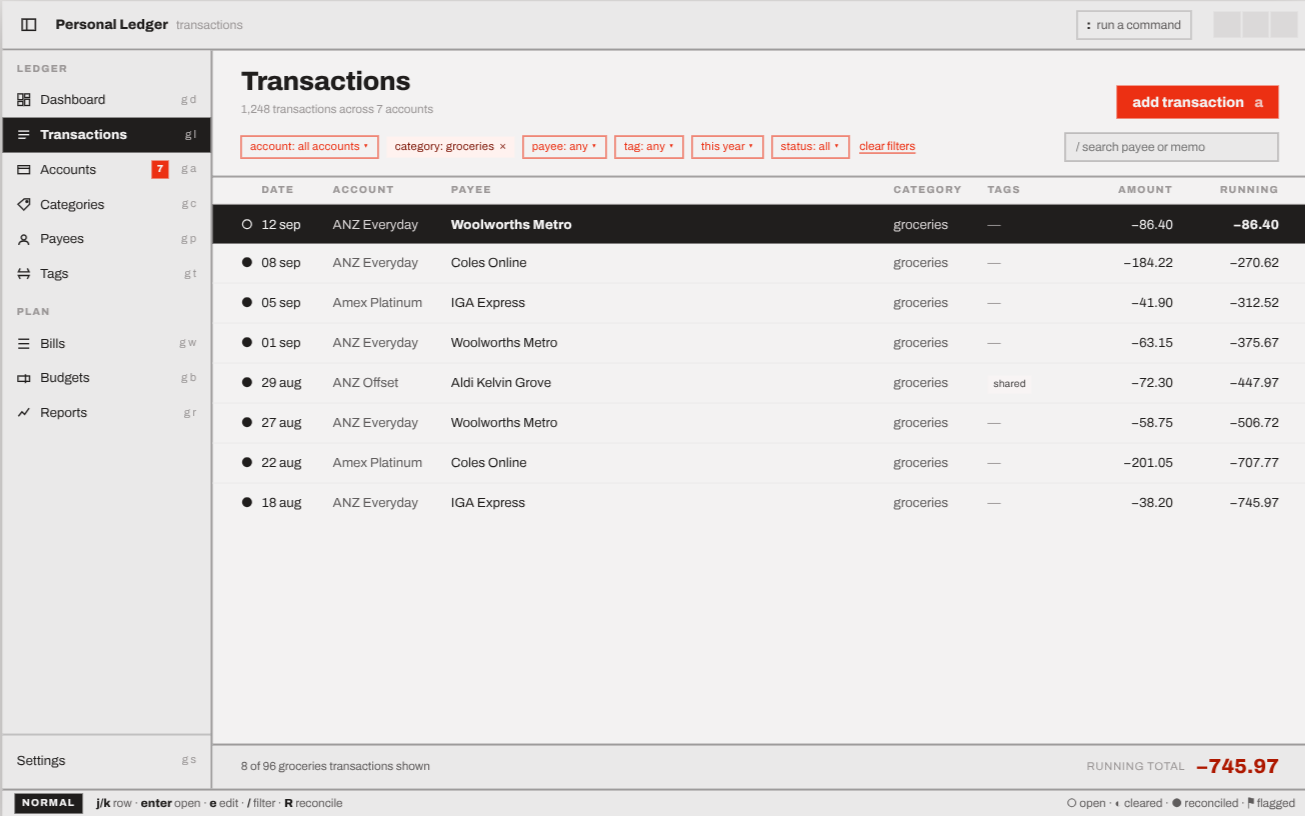
- A desktop app that runs natively on Linux, macOS and Windows.
- A terminal (TUI) app for those of us who would rather keep our hands on the keyboard.
- A backup server you run on your own homelab in Docker. Every device keeps its own local copy of the ledger and syncs through the server when it comes online.
- Transactions recorded against accounts, payees and income or expense categories.
- Budgets to track spending against targets.
- Reconciliation, so you can check your accounts against reality with balance checks.
- Reporting on balances, spending by category and payee, and budget versus actual.
- Investments, loans and inventory: tracking buy-in costs, capital gains and returns, paying down a loan, and keeping a record of household assets.
A few principles run through it all. Data stays on the device by default. The apps never need root or administrator access to run. Encryption at rest is left to the operating system (LUKS, FileVault or BitLocker) rather than reinvented in the app. The whole thing is written in Rust, with SQLite as the local database on each device and no unsafe code allowed.
The roadmap
The project is split into four development cycles, each building on the last.
- Feasibility (v0.0.1) - Done
Prove the approach and technology before committing. Can a Rust TUI and a Rust desktop app draw the line, doughnut, candlestick and divergent charts a finance app needs? Do tables work? Can each app be compiled, installed and run as a normal user on Windows, macOS and Linux? Can two independent SQLite databases sync through a server, including a device that was offline and is now catching up on what it missed? Does the sync server run as a multi-arch Docker image, as a non-root user, with its data surviving a restart?
- Concept (v0.1.0) - Underway
Build a minimum viable product. This is where the TUI and desktop apps grow real screens backed by the local database: units, categories, payees, accounts, transactions, budgets, balance checks, reporting and CSV import. Both clients are built in parallel on the same shared core, so the desktop app isn’t stuck waiting for the terminal app to finish.
- Development (v1.0.0)
Expand the functionality, improve the user experience, and harden the code and security.
- Fixes & Features (v1.0.1)
Use the thing in anger, then fix the pain points and add the features that make it more useful day to day.
Beyond v1
Some ideas are deliberately parked until the foundations are solid:
- Shared ledgers for couples, families and groups.
- Converting between currencies, crypto, stocks and other units.
- More ways to budget, such as envelope, percentage split and reverse budgeting.
- Investment, loan and inventory tracking.
- Double-entry accounting, if the need ever proves real.
A teaser: building it with Claude
I am not writing most of Personal Ledger’s code by hand. I’m building it with Claude Code, Anthropic’s AI coding agent, with me acting as the product owner, architect and reviewer rather than typist.
That has changed how I work. The product requirements document, the glossary of domain terms and the architecture decision records are no longer paperwork that drifts out of date. They are the context that keeps an AI agent pointed in the right direction, and the project is better documented as a result.
More to come on this later.
If you want to follow along, or tell me why my approach to tracking money is wrong, the code is on GitHub.