Why Personal Ledger Uses VIPER
contents
Personal Ledger has been written with the assistance of AI. That reinforces, not changes, what I want from an architecture. I still want code that is easy to read, test and change, but I also want code that an assistant can pick up cold just like you would with a code base worked on by a big team, change in one place, and hand back to me in a shape I can review quickly.
Early on, the app was heading the usual way: a few big files that knew about everything. The screens drew the data, worked out the rules, saved to the database and decided where to go next. Every change touched one of those files, and every change got a little harder. So I moved Personal Ledger to an architecture called VIPER. This post covers what VIPER is, why I think it is a good fit for most apps, and why it is an even better fit when an AI is writing a lot of the code.
What VIPER is
VIPER comes from iOS development, where view controllers tended to grow huge because they did everything. It splits each area of an app, called a module, into five parts. Each part has one job, talks only to its neighbours, and data flows one way through them.
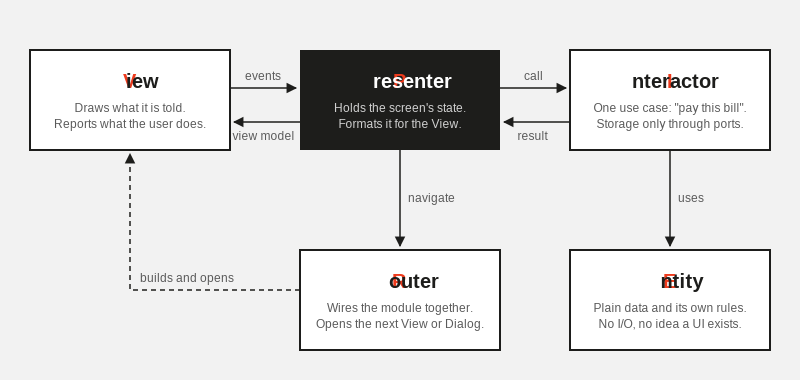
The VIPER model: each part has one job and only talks to its neighbours.
- View: draws what it is told and reports what the user does. It makes no decisions. It never formats a number or works out whether a button should be enabled. It receives a ready-made view model, draws it, and sends events back, like “Pay pressed on row 3”.
- Interactor: the business logic. One Interactor is one thing a person wants to do: “pay this bill”, “delete this payee if it has no transactions”. It knows the rules and reaches storage through ports (interfaces), but it has no idea a screen exists.
- Presenter: the middle part, and the one most often skipped. It takes events from the View, decides which Interactor to call, and turns the results into something the View can draw: formatted money, translated text, which row is selected, whether a dialogue is open. It holds the screen’s state, but no UI code, so it can be tested without a window.
- Entity: the plain data model, like an Account, a Bill or a Transaction, plus rules about itself only. No database, no clock, no knowledge of the other parts.
- Router: navigation and assembly. It wires the View, Presenter and Interactor together, and opens the next screen or dialogue when the Presenter asks for it.
Why VIPER is good for development
The main benefit is separation of concerns. Each part answers one question, so when something goes wrong, you know where to look. A wrong total is in an Interactor or an Entity. A total shown with the wrong number of decimal places is in a Presenter. A total drawn in the wrong spot is in a View.
It also makes testing easy. Interactors, Presenters and Entities have no UI toolkit and no database in them, so they can be tested with plain unit tests and in-memory fakes, no window and no SQLite file needed. The Views are thin enough that their tests only need to check wiring and drawing.
And it suits an app with more than one front end. Personal Ledger has two Clients, a desktop app and a terminal app. Both show the same Ledger, so both use the same Presenters and Interactors. Only the Views and the Router implementation are written twice, once for each UI toolkit. When I fix a rule, both Clients get the fix.
The cost is boilerplate. A small feature that could be twenty lines in one file becomes an Entity, an Interactor, a Presenter with its event and view model types, a port, a fake for the port, a View and a Router method. That is a lot of ceremony, and it’s why many people try VIPER once and walk away.
Why it fits AI-assisted development
When I am working with an AI assistant, that trade-off changes.
Boilerplate is cheap now
Boilerplate is what an AI is best at. It is repetitive and follows a pattern that is already in the codebase. When I ask for a new use case, the assistant reads an existing Interactor, its port and its test, and writes the new one in the same shape. The ceremony that used to cost me an afternoon of typing now costs a few seconds of generation and a few minutes of review.
The structure also helps the review. Because every module has the same shape, I know what to expect before I open a file. An Interactor that has started formatting text, or a View that is making a decision, stands out straight away. The pattern is a checklist the assistant and I both work from.
Small files mean less context
An AI assistant works inside a context window: everything it has read, everything it has written, and the conversation so far. That window is limited, and what fills it matters. The more irrelevant code an assistant has to read to make one change, the less room it has to think about the change, the more it costs, and the more likely it is to lose track of a detail.
VIPER keeps files small and focused. In Personal Ledger, each use case is its own file, so “change how deleting a payee works” means reading one Interactor of about 80 lines, its port and its tests, not a whole screen file that also draws the list, handles the keys and talks to the database. Across the shared libraries, there are over 500 source files, and the median is around 140 lines. The Presenters are the biggest part because they hold a screen’s state, but they are still one screen each.
Smaller files help in a few ways:
- Less to read. The assistant loads only the files for the part it is changing, which leaves more of the context window for the actual work.
- Less to get wrong. A change in a 100-line file has fewer places to go wrong than the same change buried in a file twenty times the size, and the diff is easier for me to review.
- Easier to find. File names say what they hold, like interactor/delete_payee.rs or presenter/payee_form.rs. The assistant can usually find the right file from the name alone, without searching through the codebase.
Boundaries the assistant can’t quietly cross
Separation of concerns is only useful if it holds. With an AI writing code, the easy shortcut is always there: reach into the database from a screen, or have one domain call another directly, because it works and the tests pass.
Personal Ledger uses tooling, not AI, so it doesn’t rely on the assistant remembering the rules. The shared libraries can’t depend on a UI toolkit, on the database crate, or on each other, and the build checks this. If a change breaks a boundary, the tooling fails it before I ever see it. That turns the architecture from a convention into something the tools enforce, which matters a lot more when you are not typing every line yourself.
How Personal Ledger uses VIPER
Personal Ledger is written in Rust and split into crates. VIPER maps onto them like this:
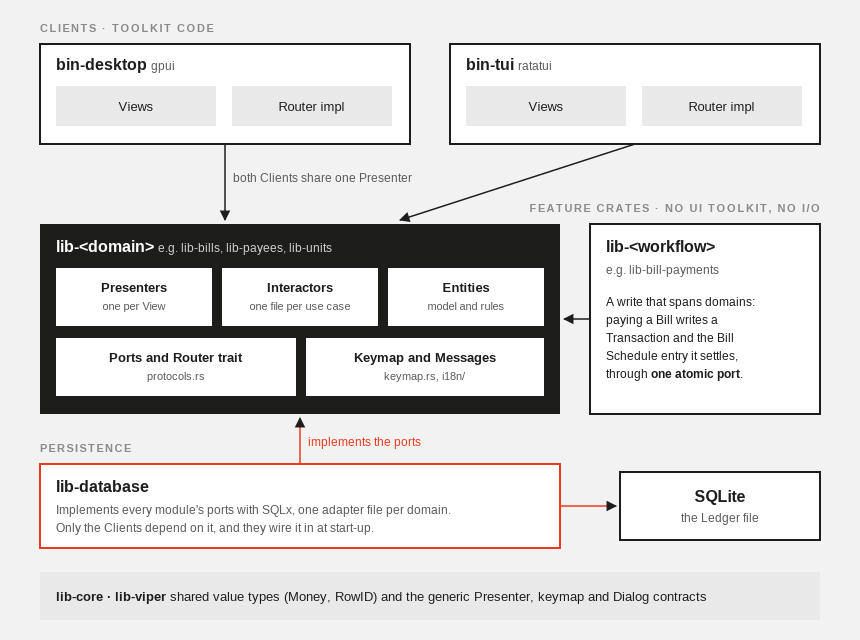
How Personal Ledger splits VIPER across its Rust crates. Dependencies point inward, toward the Entities.
- A feature crate per domain, such as lib-bills or lib-payees, holds everything that doesn’t touch a UI toolkit: Entities, Interactors, Presenters, ports, the Router trait and the default keymap. Both Clients share it. A module is a domain, not a screen, so one change usually touches one crate.
- A folder per domain in each Client holds what touches the toolkit: the Views and the Router implementation. The desktop app draws with gpui and the terminal app with ratatui.
- A cross-domain crate per workflow handles the few operations that write more than one domain. Paying a bill writes a Transaction and marks the bill as paid, so it lives in lib-bill-payments and saves both through one atomic port. Feature crates never depend on each other, so this is where that kind of work belongs.
- lib-database implements every module’s ports with SQLx over a SQLite file. Only the Clients depend on it, and they plug it in when the app starts. Swapping it for in-memory fakes is how most of the tests run.
- lib-core and lib-viper hold the small set of shared pieces: value types like Money, and the generic Presenter, keymap and dialogue contracts every module builds on, so a new module imports them instead of copying them.
Moving to this layout is still in progress. Each domain moves over in its own slice, and the architecture notes set out where it is heading. But the payoff has already shown up. New features land as new files rather than longer ones, and most changes the assistant makes stay inside one crate and one layer.
Wrapping up
VIPER asks you to write more code up front in exchange for code that is easier to understand, test and change. For a long time that was a hard sell. With an AI assistant writing much of the boilerplate, the cost has dropped a lot, and the benefits have grown: small files keep the assistant’s context focused, clear boundaries keep its changes contained, and a consistent shape makes its work quick to review.
If you are building something with an AI assistant and your files keep getting longer, it is worth a look. The code is on GitHub if you want to see how it hangs together.